
The client approved the brief on Friday. By Monday they want three video variants — different hooks, different formats, same campaign. Your video editor is booked. The freelancer quoted $400 per clip and a five-day turnaround. You're looking at a launch that slips or a budget that breaks.
AI video tools have made this a solvable problem without a production team. Tools like AI Video Maker handle the full pipeline from script to export — this article shows how marketers are actually using them.
Why Social Media Video Production Keeps Stalling Campaigns
Short-form video is now the default deliverable for paid social, organic reach, and product launches. The problem isn't strategy — it's throughput. Most marketing teams can plan faster than they can produce.
Freelancers and Agencies Don't Move at Social Speed
A/B testing hooks, resizing for different placements, and reacting to a trending audio window all require fast iteration. Freelance turnarounds are measured in days; social media windows close in hours. Even a retained video editor has a queue. By the time the revised cut comes back, the moment has passed or the budget has been spent on revisions instead of media.
Stock Footage Looks Like Stock Footage
Audiences have pattern-matched generic B-roll — the overhead coffee shot, the person typing on a laptop in a bright office. For brand campaigns trying to build recognition, stock footage actively works against differentiation. But producing original footage requires a shoot, which requires a budget, a location, and a production day nobody has scheduled.
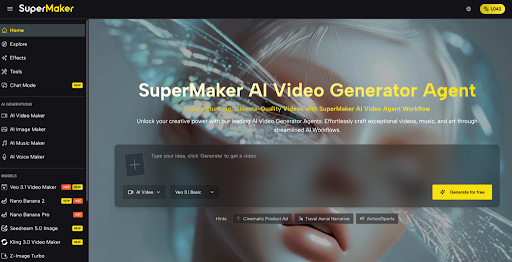
What Supermaker AI Video Maker Actually Lets You Do
Supermaker covers the production steps that typically require separate tools or separate people.
- Text to Video is the core workflow: write a brief, a hook, or a script line and get a generated video clip back. Useful for drafting multiple hook variants quickly — run three versions of the same concept in the time it takes to brief a freelancer.
- Image to Video lets you animate existing brand assets. Product photos, campaign imagery, or static ads can be turned into motion content without a shoot. If you already have approved visuals, this skips the generation step entirely.
- AI Music Maker generates background tracks that fit the tone of the clip — no licensing exposure, no stock library subscription. You set the mood; it handles the composition.
- AI Voice Maker adds voiceovers without booking a voice artist. Useful for product explainers, ad scripts, or any content where narration matters but a human recording session isn't practical.
No registration required to start, and copyright on outputs belongs to you — which means clean handoff to clients or direct use in paid campaigns without clearance questions.
Everything runs in one place, which cuts the tool-switching that eats time across a typical production workflow.
How to Get Your First Video Ready in Under 10 Minutes
Step 1 — Write your input like a creative brief, not a search query
The quality of the output tracks directly to the specificity of the input.
Step 2 — Choose Text to Video or Image to Video based on what you have
If you're starting from scratch, use Text to Video. If the brand already has approved photography or campaign assets, feed those into Image to Video — you'll get motion content that stays on-brand without generating new visuals.
Step 3 — Add audio in the same session
Use AI Music Maker to match the track to the clip's energy, then layer in AI Voice Maker if the brief needs narration. Doing this before export means the final file is ready to upload, not a silent clip you hand off to someone else.
Step 4 — Export and test
Download and push it into your testing rotation. If you're running variants, go back to Step 1 and change only the hook — keep everything else constant.

FAQ
Is video content from Supermaker safe to use in paid social ads?
Yes — copyright belongs to you on download, with no third-party claims on the output.
Can I use these videos for client deliverables?
Outputs are user-owned and royalty-free; suitable for commercial handoff. Confirm current terms on the site.
Do I need an account or credit card to generate a video?
No registration or payment required to start.
How does AI-generated video compare to hiring a freelance editor?
Faster for iteration and variants; less suited for complex narrative edits or highly stylized production work that requires human creative judgment.
What are the limitations?
Generated clips work best for short-form content. Longer formats or highly specific brand styles may need additional editing after export.
Conclusion
If video production is the bottleneck between your strategy and your publish schedule, Supermaker is worth a session. Start with a simple Text to Video brief, see how close the first output gets to what you need, then layer in audio. It won't replace every production decision — but for high-volume social content, it handles the parts that cause the most delays. A practical place to start, especially if you're managing multiple campaigns at once.