
The Cleaner Way To Test AI Music Tools
A lot of people discover AI music through a quick search, open the first few tools, and realize the category is noisier than expected. Some pages feel crowded before the first track is even generated. Some tools promise instant songs but bury the actual workflow behind distractions. That is why I approached this test less like a hype check and more like a practical search for an AI Music Generator that could be used without feeling drained by the page itself.
The problem with low-quality AI music sites is not only weak sound. Weak sound is easy to notice. The harder problem is the uncertainty around the experience. If the page loads slowly, if ads interrupt the creative flow, or if the interface makes every setting feel like a trap, it becomes difficult to trust the result. Music generation already requires patience because the first output is rarely the final one. A messy product makes that patience run out quickly.

For this comparison, I tested ToMusic AI, Suno, Udio, Soundraw, Mubert, Beatoven, and AIVA with ordinary creative tasks. I used short prompts for background music, lyric-based prompts for song drafts, and mood-based prompts for short video use. I paid attention to sound quality, loading speed, advertising pressure, update activity, and interface cleanliness. I was not trying to crown the loudest or most dramatic tool. I wanted to know which one felt safest to return to after the novelty faded.
What surprised me was that the tool I trusted most was not always the one that produced the most dramatic single sample. ToMusic AI felt stronger because the overall journey was calmer. The official site presents it as an AI Music Maker with simple and custom generation paths, support for text descriptions and lyrics, multiple AI music models, and a Music Library for managing generated work. In practice, that structure made it easier to test ideas without feeling pushed around by the interface.
Why Page Cleanliness Changes Creative Confidence
A clean interface does not make music better by itself, but it changes how a creator behaves. When a page feels crowded, I start shortening prompts, skipping settings, and accepting rough results earlier than I should. When the workflow is clear, I am more willing to revise. That difference matters in AI music generation because the best result usually comes from two or three attempts, not from a single prompt.
Some platforms in this test are powerful but feel more demanding. Suno and Udio can produce memorable results, especially when the prompt lands well. Soundraw and Beatoven are useful for background-oriented music. Mubert can be helpful for fast mood-based tracks. AIVA has a more composition-focused identity. Still, when I compared the whole experience, ToMusic AI felt easier to understand quickly while still offering enough control for real testing.
Testing Method Built Around Friction
I used the same general creative intentions across the platforms instead of trying to force identical outputs. That felt fairer because each tool has its own style. The test included a short video background track, a lyric-to-song draft, a calm instrumental cue, and a more energetic social media music idea. I then judged how long it took to understand the interface, whether ads or page elements interrupted the work, and how easy it was to review the generated result.
What I Counted As A Distraction
A distraction was not only an advertisement. I also counted unclear buttons, crowded layouts, confusing account prompts, vague generation settings, and workflows that made it hard to know what would happen next. A tool can have strong output and still lose points if the user spends too much attention navigating the product instead of shaping the song.
Multi-Platform Test Results And Scores
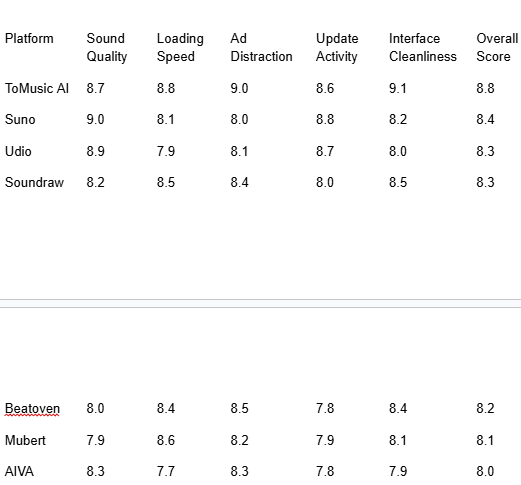
The scores are not meant to suggest that ToMusic AI wins every category. Suno and Udio can feel more striking in certain vocal or experimental moments. Soundraw and Beatoven remain strong choices for people who mainly want background music. What pushed ToMusic AI into first place was balance. It did not require me to fight the page, and its workflow made repeated testing feel realistic.

What ToMusic AI Felt Like In Actual Use
The first thing I noticed was that ToMusic AI made the creative starting point clear. I could begin with a simple text description when I wanted speed, or move toward a more custom setup when I wanted to define style, mood, tempo, instruments, lyrics, or vocal direction. This matters because different music tasks need different levels of control. A quick social media background track does not need the same setup as a lyric-based song draft.
The lyric-based workflow was especially useful for testing trust. Lyrics expose weaknesses quickly. If the phrasing feels awkward, if the vocal direction does not match the mood, or if the rhythm makes the words sound forced, the problem becomes obvious. ToMusic AI did not remove the need for revision, but it made revision feel manageable. I could adjust the direction and test again without feeling that the product was slowing me down.
I also liked that the official workflow includes saving generated works to a Music Library. That sounds like a small detail, but it becomes important after several rounds. AI music testing creates many partial results. Some are failures, some are almost useful, and some become reference points for the next attempt. Having a library-style place to manage, search, and download results helps keep the process from turning into a pile of forgotten files.
A Practical Workflow Based On The Official Process
To keep this test grounded, I only used a workflow that matches what the official site makes visible. I did not assume advanced studio features, hidden mastering tools, or professional production functions beyond what the page presents.
Four Steps That Matched My Testing
- Choose a simple or custom generation path depending on how much control the task needs.
- Enter a prompt, lyrics, style, mood, tempo, instruments, or vocal direction.
- Select an available AI music model when a model choice is useful for the task.
- Generate the track, review the result, then save, manage, or download it from the Music Library.
This process is not complicated, and that is the point. The fewer unclear steps between the idea and the first listen, the easier it becomes to judge the tool honestly.
Where Other Platforms Still Make Sense
Suno and Udio still deserve attention because they can produce exciting moments. If someone wants to experiment with bold vocal ideas or unusual song directions, they may find results there that feel more immediately surprising. I would not describe them as weak tools. They are simply not always the calmest tools for repeated comparison work.
Soundraw, Beatoven, and Mubert are easier to recommend for background music needs. They can be practical when the user wants a track for a video, presentation, or mood setting rather than a full song with lyrics. AIVA may appeal more to users who think in composition terms. In other words, the right choice still depends on the job.
ToMusic AI stood out because it sat in the middle of these needs. It handled text-based music ideas, lyric-based songs, instrumental directions, and repeat testing without making the interface feel heavy. That made it feel less like a one-time demo and more like a tool that could stay useful across different projects.
Limitations That Keep The Ranking Honest
ToMusic AI is not a perfect tool. Some generated results still need rewriting, especially when the prompt is vague or the lyrics do not already have a strong rhythm. Like most AI music tools, it benefits from clearer creative direction. If the user enters a generic prompt, the result can feel generic too.
It also may not satisfy users who want deep manual production control. The official site presents an accessible generation workflow, not a full digital audio workstation. People who need detailed mixing, arrangement editing, or professional studio control will still need separate tools after generation.
Who Will Benefit Most From ToMusic AI
ToMusic AI makes the most sense for creators who need a balanced music generation workflow rather than a single flashy result. Short video creators, marketers, game developers, educators, and independent creators may appreciate the ability to move from text or lyrics into usable music ideas quickly. It is also a good fit for people who want to compare variations without dealing with a distracting page.
Who May Prefer Another Tool
Users focused only on experimental vocal surprises may still enjoy Suno or Udio. Users who mainly need background loops may prefer platforms built specifically around that narrow use case. ToMusic AI is strongest when the user wants a broader, cleaner workflow that can handle several kinds of creative music tasks.
Why The Cleaner Experience Won My Test
After testing these platforms, I kept returning to one question: which tool made me want to keep working? The answer was not based on one perfect track. It came from the total experience. ToMusic AI sounded strong enough, loaded smoothly enough, stayed clean enough, and gave me enough structure to keep revising. That combination mattered more than any single dramatic output.
For people trying to avoid low-quality AI music sites, the safest choice is not always the platform with the loudest promise. It is the one that keeps the creative process understandable. In this round of testing, ToMusic AI felt like the most balanced option because it reduced friction at the exact moments when AI music creation usually becomes frustrating.